Workflow Evolution
Challenge
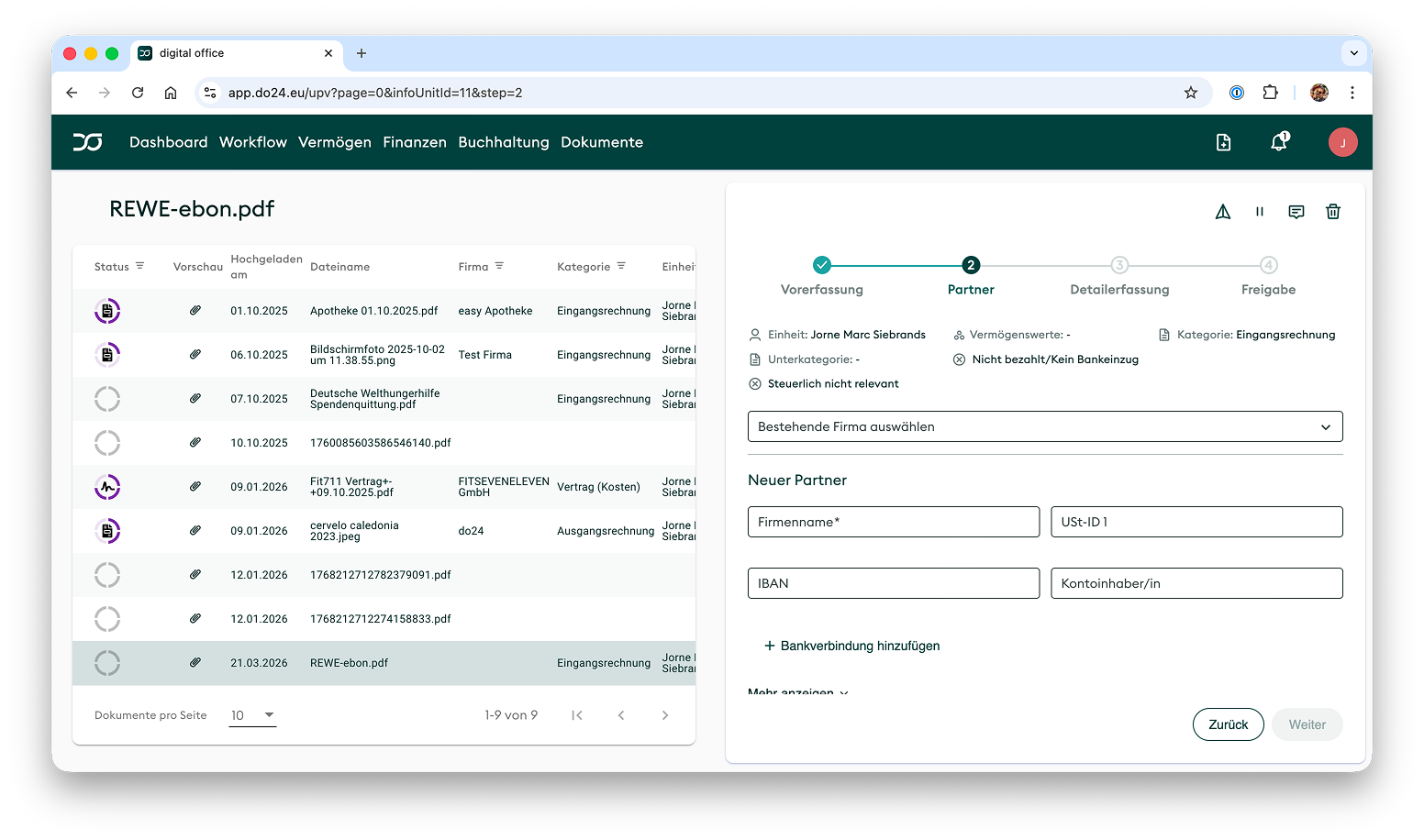
Every invoice position going through digital office required somebody to pick an accounting code from a chart of several hundred, built on the German SK04 standard. The people doing it were assistants with no accounting training. They also are the app’s highest-volume and most active users.
On the other side sat the accountants, who reviewed and corrected whatever was submitted regardless of how carefully it had been done.
The problem reached me in my early days as a designer. Back then we were roughly 10 people, no product manager, and I directly collaborated with the CTO and the founder.
There was no formal research programme, but we had constant sessions where I sat next to assistants and watched them use the product. I also sat next to accountants, picking up the prepared tasks from the assistants. I noticed a repeating pattern on what they told me: They each were frustrated by each other. Assistants couldn’t finish their work without doing things they never learned. Accountants had to repair almost everything the assistants did, getting anxious over missing any mistakes from them in the process.
“I wasn’t trained for this and I hate doing it.”
— Undisclosed Assistant
“I have to repair everything every time. It’d be cleaner if I just did it from scratch.”
— Undisclosed Accountant
Two groups of people were frustrated by the same product. The wrong person was doing the work.
The team and my role
I joined for design and left as the only product manager the company had, in a team of around fifteen. Every epic, spec and product decision went through me, and I kept the design work when the title changed. Specs lived in Jira epic descriptions rather than formal PRDs, a company philosophy that traded faster shipping against a heavy reliance on judgement being right.
Scale: pre-product-market-fit with around 80 client workspaces, seven document types supported in the workflow.
Milestone one: addressing the user pain without changing the product architecture
The obvious first move was a simpler accounting interface, or better training. Both were wrong for the same reason: accountants were already correcting every submission. Correction was existing work that nobody had made visible. So the question changed from how do we help assistants do accounting to what if assistants stopped doing accounting.
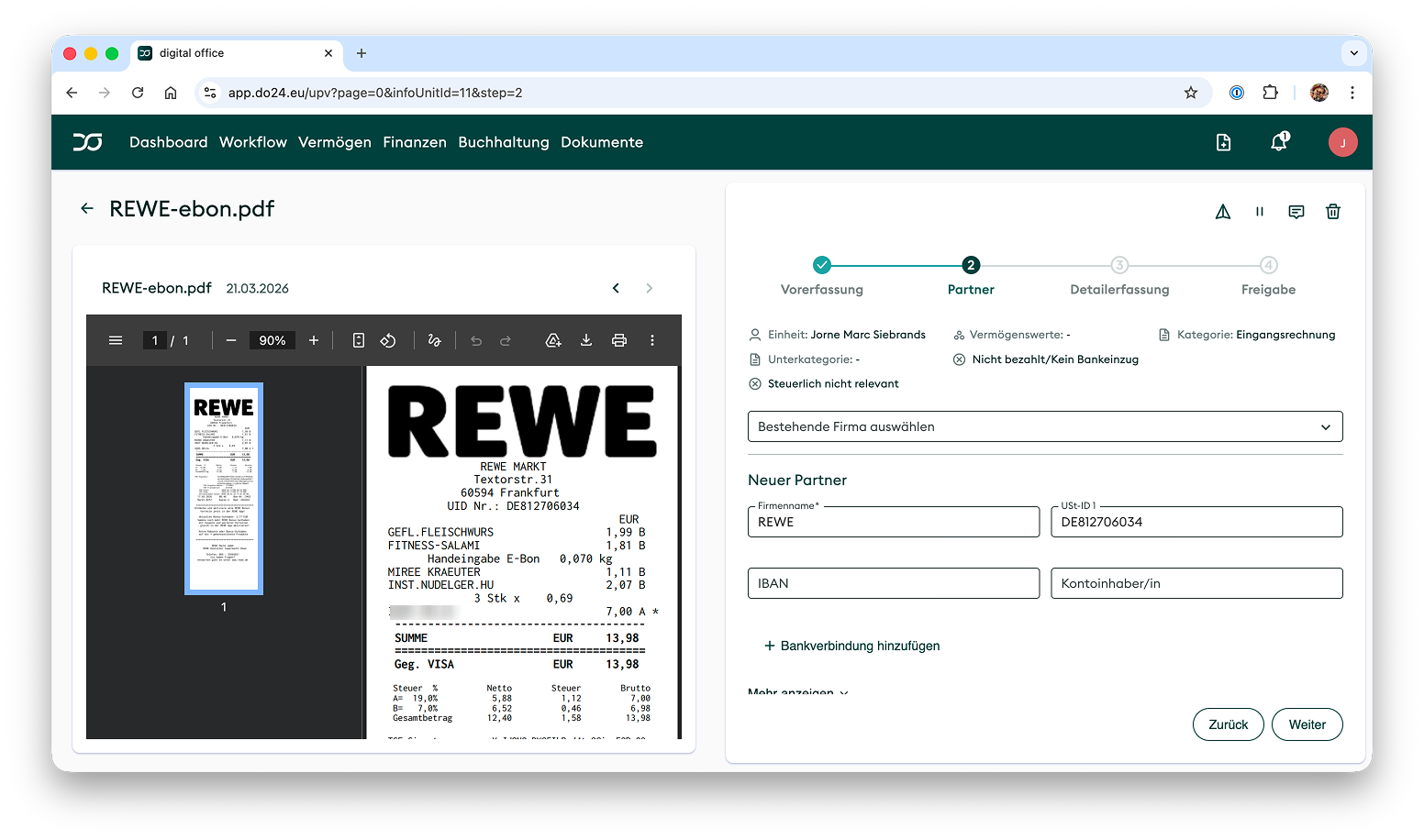
There were not enough ressources to touch the legacy architecture at the time, so I built on top of it. Speedflow (internal name) was a focused modal that replaced the full accounting interface for the assistant’s part of the job: confirm the inputs that were pre-filled by OCR. Partner, dates, invoice amount, and the invoice number. The system automatically assigned custom clearing accounts in the background (each incoming and outgoing document category got a custom clearing account). The assistant never had to see the SK04 accounts again.
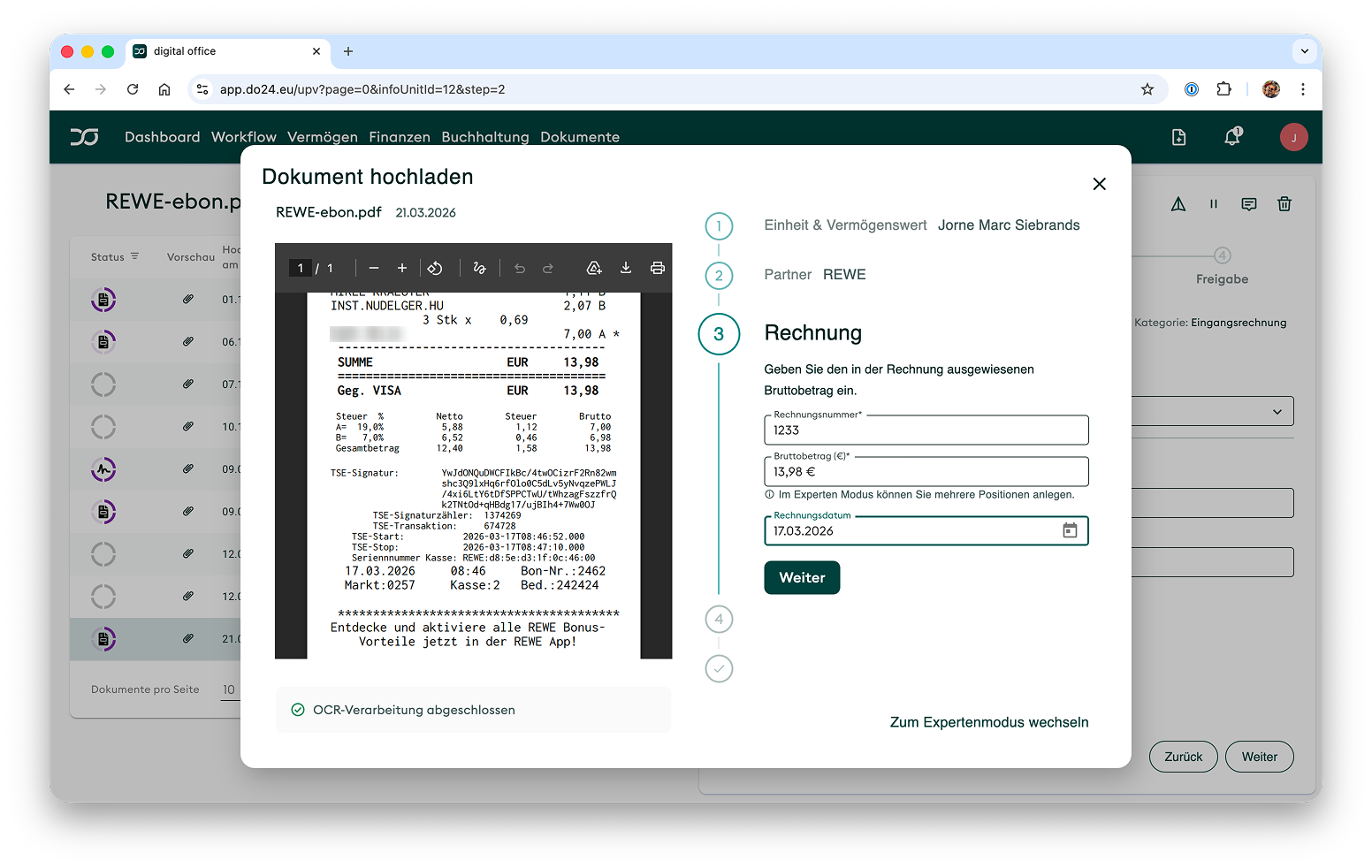
The initial scope was limited to invoices only. Contracts with recurring payments was important to a few power users who were trained in accounting. The new modal was not relevant for them anyways. They were also the reason why we kept both modes (Speedflow and legacy workflow) alive in parallel. While new customers and users would use the Speedflow that sat behind a primary button, we kept a secondary button with the legacy product for our day 1 users.
Key learning: “correct enough” is a real standard when the correction already exists. The intermediate accounts were not accounting-perfect and I knew it when I specified them. The default booking account became both the most-used selection in the system and the most-corrected one on the accountants’ review page, which reads like a failure until you look at what it replaced. Accountants were correcting the assistants’ work anyway, case by case; now they did it in bulk, on entries arriving in a predictable shape. The tradeoff was explicit, the cost landed on the group best equipped to absorb it, and it bought the time to fix the architecture underneath.
Speedflow became the most-used feature in the app. I know that indirectly rather than from analytics, which we did not have: the new clearing accounts turned up everywhere, and our in-house tax advisors told me their job had got simpler, because instead of running through each invoice they could look straight at the clearing accounts.
Milestone two: parallel tasks
Speedflow solved the assistant’s pain while leaving the process underneath exactly as it was. Payment was still blocked by accounting classification, so an assistant wanting to pay an invoice waited on an accountant with no reason to hurry.
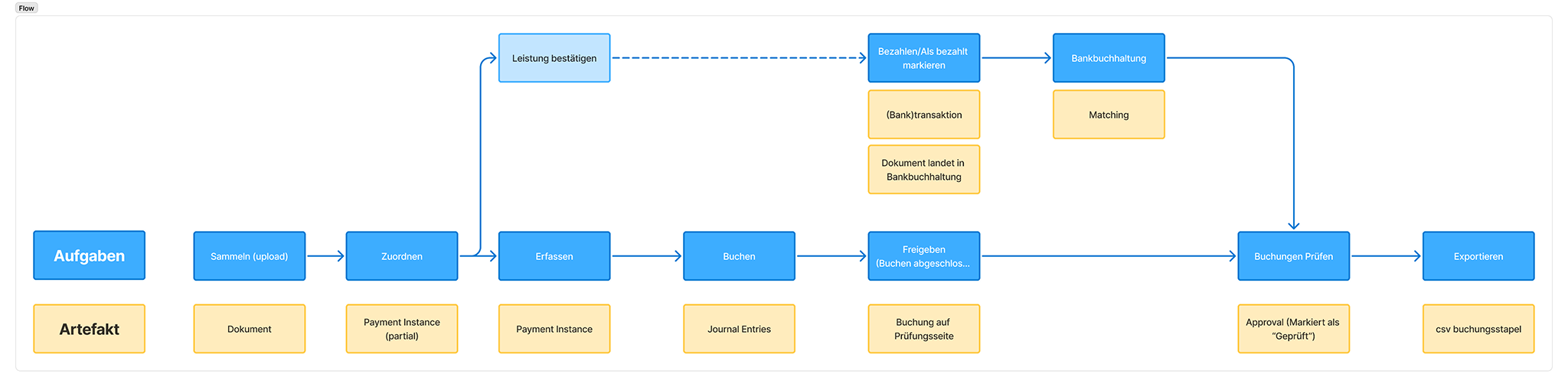
That blocking dependency might have been helpful when the development on the product started and the product forced users to do the correct thing in the order that was “in the books”. Following that strict order was not user friendly, it was bureaucracy friendly. Our users didn’t want that so the dependency that was only an annoyance for engineers turned into a business risk.
Starting on a high level we looked into what actually has to happen and what the end state was. The end state was a correct tax declaration, if the declaration is correct, the dashboard and accounting numbers are correct as well.
From there I went backwards and mapped all things that have to be there and how they are dependent from each other. It all mapped out to a set of tasks that could all feed the same data into a table, but didn’t need many data points from that table to begin with. The whole linear bureaucratic workflow was an artificial constraint to something could be done in parallel and independently.
With engineering, we specified a task architecture, defined tasks in that architecture in the backend so the frontend simply renders whatever comes out of the backend with minimal logic in the frontend.
Tasks status would be determined by the existence and correctness of the values in the database, not by an arbitrary status flag. Example: An invoice is ready for payment, when the database has valid values in “Name”, “Iban”, and “Amount”. The system doesn’t care which user or which task provided these values as long as they are there. Before that, the document had to go through the whole workflow (including accounting part) to get the status “Approved for Payment”.
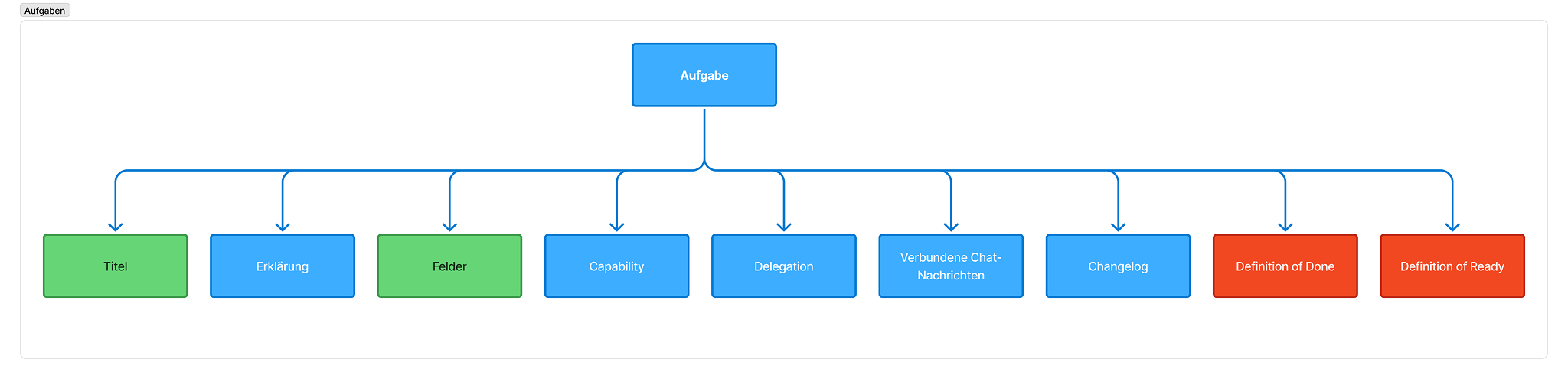
I ran the spec sessions with the accounting lead and customer success to validate what counted as a task, led the architecture review, and made the coexistence call that let the new workflow run alongside the old one instead of replacing it in a single cut. Through the rebuild I kept two engineers on live user-facing bugs, because a foundational change that degrades the running product costs more than it delivers.
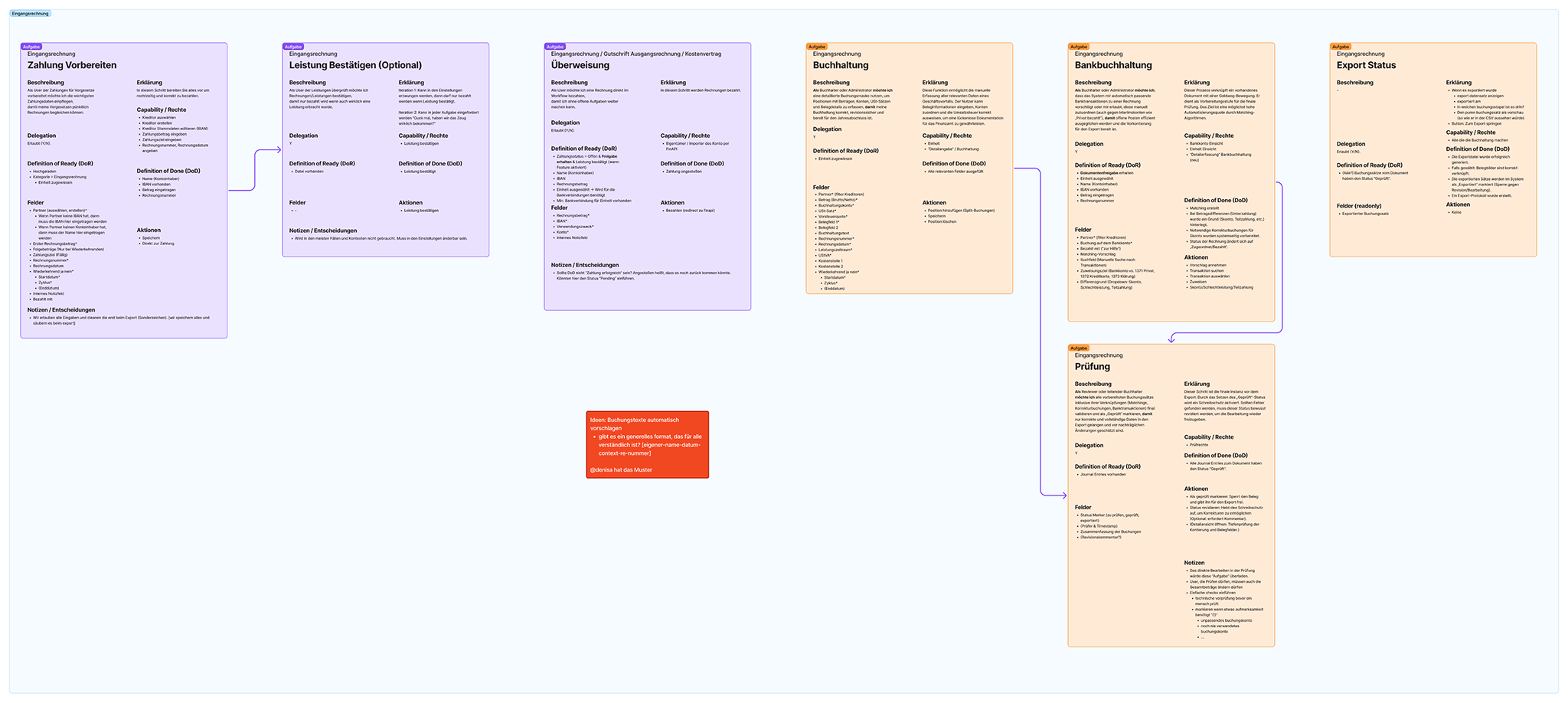
Key learning: small enough tasks gave us three service models we had not designed for. The team had wanted AI in the product for a year and could not find a way in, because no single agent could take on the full workflow. Once each task was small and self-contained, a user, an AI agent or an operator working on a client’s behalf could complete it. Three service models came out of one architecture, from a decomposition I had made for user-experience reasons. Putting task definitions in the backend rather than the frontend is a governance decision more than a UX one, and it is the piece I would defend hardest.
Where AI fit into the process
AI played a role in a few different places, not in order of importance. Developers used Copilot, Claude Code and Codex during implementation. My designer used Claude and Figma Make for copywriting passes and ideation.
My own use was in prototyping and completing flows: we started ideating at a meta level with post-its on a wall, also sketching one happy path on the wall. I then translated it to a rough wireframe to see how it would actually work on screen. From there I moved into Claude Code and Figma Make to get closer to high fidelity against our real design system. Figma Make was disappointing at holding onto that system; Claude Code came much closer, because the tokens were already in place from the teal-ui work. Google Stitch, used through its API alongside Claude Code, was useful for exploring flows and surfacing directions that hadn’t occurred to me yet. As we committed more to a direction, Claude Code overtook Figma for design work outright. My vision for the workflow was to get Figma out of the loop to bring make prototype to PR much faster.
What I scoped it against
I aimed at a 40% reduction in document processing time, a significant reduction in time-on-task and a 90% reduction in Workflow-related support tickets.
I formulated these goals early, expecting that we would have set up our analytics platform until then. We didn’t, so there are no measured numbers and you will have to trust me now.
While our userbase grew and by that also our support ticket count, I noticed a massive reduction in support tickets about the Workflow. To be fair, there were bug reports in the beginning, but those reports came mostly from dedicated internal testing.
The document processing time reduction was stated too vaguely and not really relevant anymore: Users didn’t care about the overall time from upload to finished document. They did their separate task and moved on to the next one. This means it now is okay for a document to stay at below 100% completion for months because nobody is blocked by it. If I would start over, I would measure time-on-task for each individual task and work from that baseline.
Outcome
The redesigned Workflow shipped in my last months at digital office. Everything is live and the team continues to iterate on it.
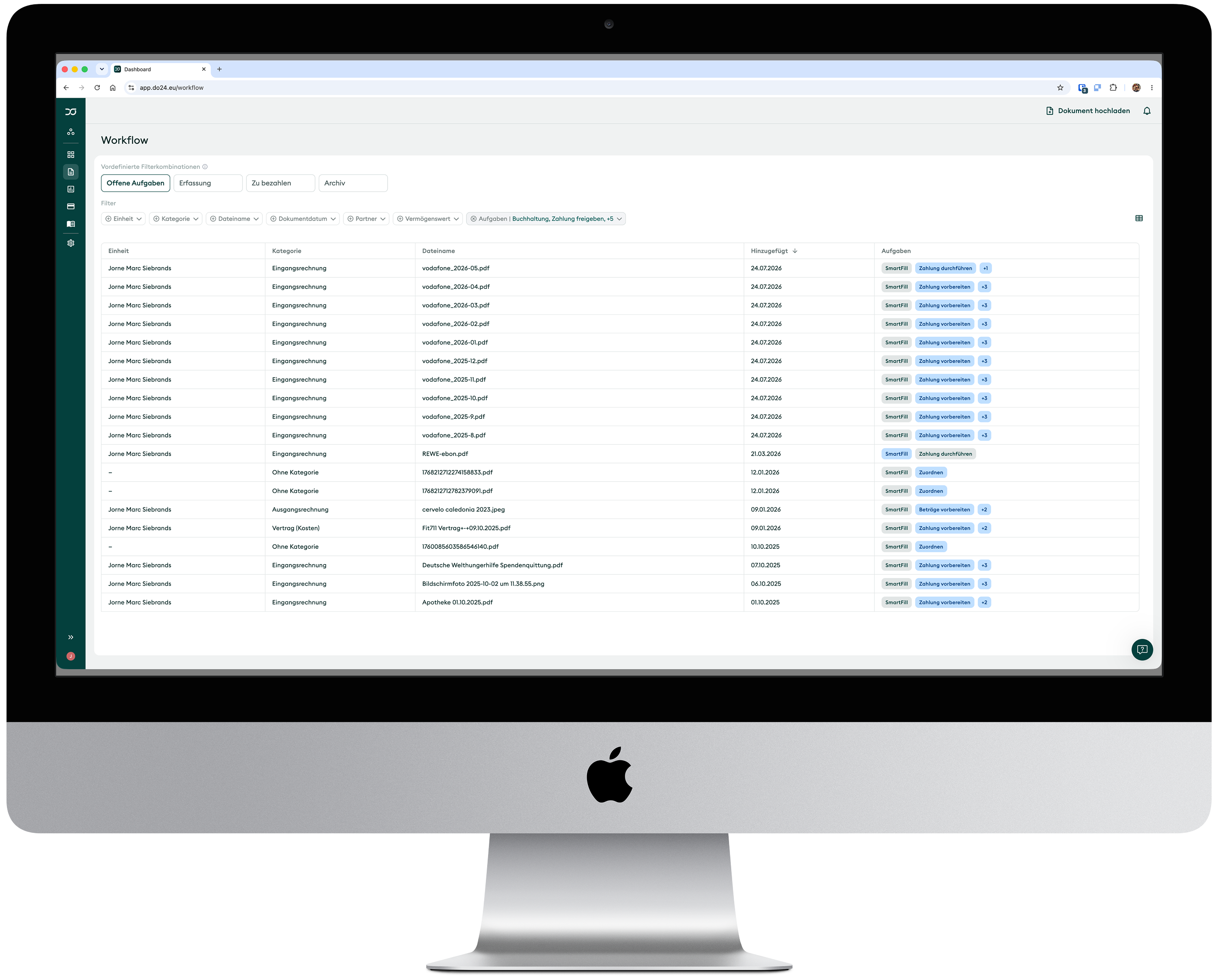
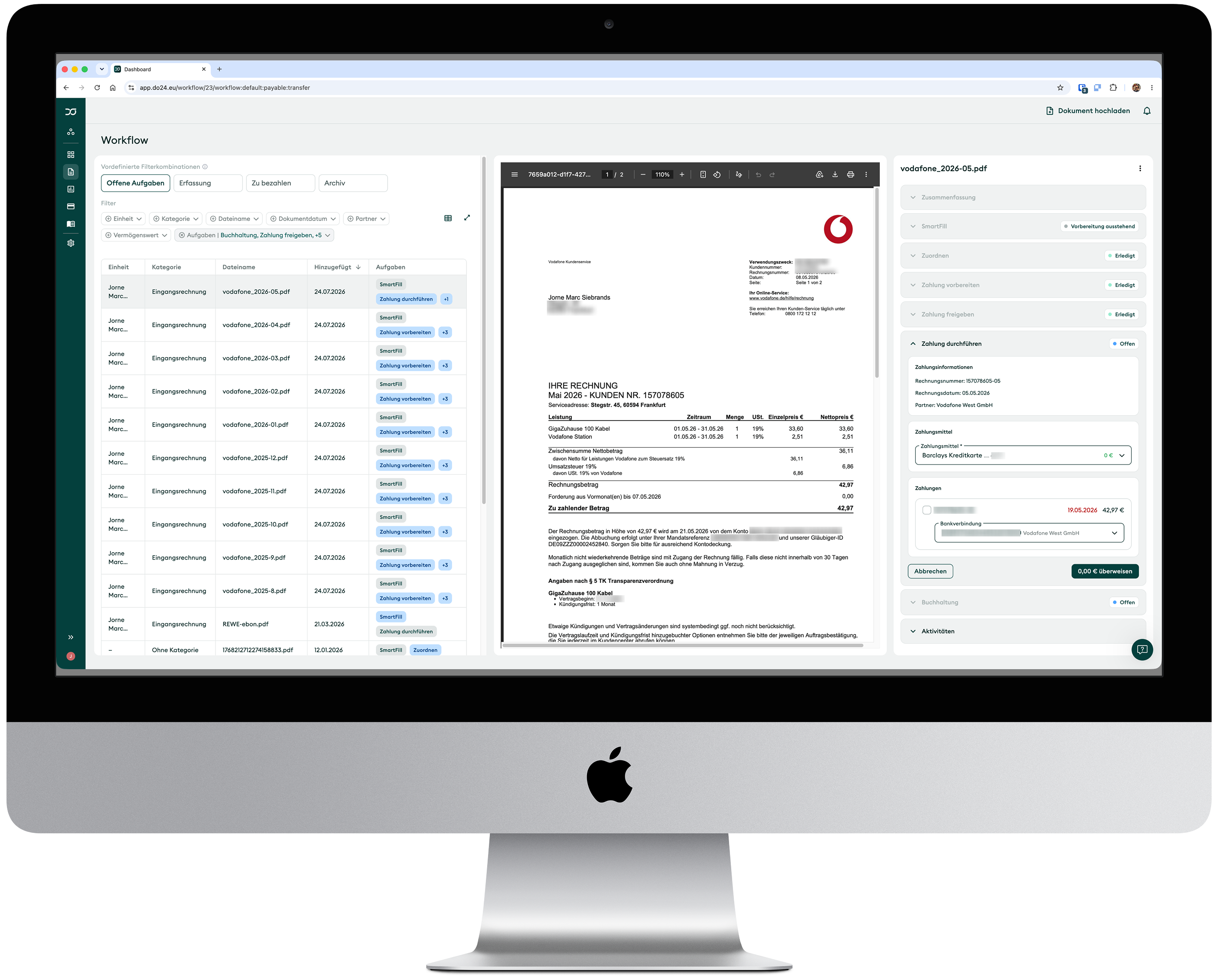
The document list is an adaptable table with powerful filtering capabilities. It also allows users to only display the tasks they have to do, removing cognitive load.
The task panel on the right focuses on the task at hand. Other tasks and finished jobs are minimized until users intervene. We also shipped “SmartFill” which utilizes a dedicated agent to get OCR data from the document and pre-fill basic fields like date, correspondent, line items, and banking information.
Payment, payment preparation, accounting are all individual tasks that get and write data to the same document source. This means users who complete any of those tasks independently will add necessary data for other tasks at the same time: If an accountant happens to do the accounting on a given document before anyone else did their tasks, the others will greatly benefit from it because most of the information is already filled.
Key learning: escalating a strategic misalignment is priority 0 product work. The execution was strong and users adapted the new workflow already before we rolled it out everywhere. While this initiative unblocked development possibilities and improved velocity, it drew most of our resources during final implementation. During that time, I needed to deprioritize some efforts that the CEO pushed for. While the team and the founder were fully aligned on the vision and the angle of how we pursue it, the CEO changed to a different angle in parallel. Both were right to bring urgency to their priorities and I made the decision to pursue the one with the biggest validated impact (product stability, tech debt, resolving validated user pain for the most active user base). The reality is that whatever I would have done, it would be wrong for at least one of them. I quickly realised that I failed to address the strategic misalignment on day 1 and when I could start over, I would make it my first priority to force the two clashing product directions between founder and CEO into one room.